Concept 8: SvelteKit
Svelte as the UI
🎯 Learning Objectives
By the end of this lesson, you will:
- Understand the difference between Svelte and SvelteKit
- Learn how SvelteKit extends Svelte with full-stack features
- Set up a basic SvelteKit project structure
- Add Bootstrap 5 to your SvelteKit project

ℹ️ What is Svelte? Svelte is a UI layer that helps you build user interfaces. However, it has some limitations:
- No built-in router: You can't split your app into different pages
- No server-side rendering (SSR): All code runs only in the browser
- Single-page limitation: Your entire project exists as one big page

🚀 SvelteKit Framework
SvelteKit is a powerful framework that solves Svelte's limitations. It lets you build full-stack applications with these amazing features:
- Automatic routing: Create new pages by simply adding files to the routes folder - no code needed!
- Server-side capabilities: Build both frontend and backend in one project
- Hot-reloading with Vite: See your changes instantly without refreshing the page
💡 Tip Think of SvelteKit as Svelte's big brother - it has all of Svelte's powers plus extra superpowers for building complete web applications!
📁 Project Structure
To get started with SvelteKit, access this starter project:
https://stackblitz.com/edit/sveltekit-starter
A SvelteKit project has two main folders you need to know:
- src folder: Contains all your source code
- Components, routes, JavaScript, CSS, and HTML files live here
- This is where you'll spend most of your time coding
- static folder: Stores your assets
- Images (.png, .jpeg)
- GIFs and favicons
- Any files that don't need processing
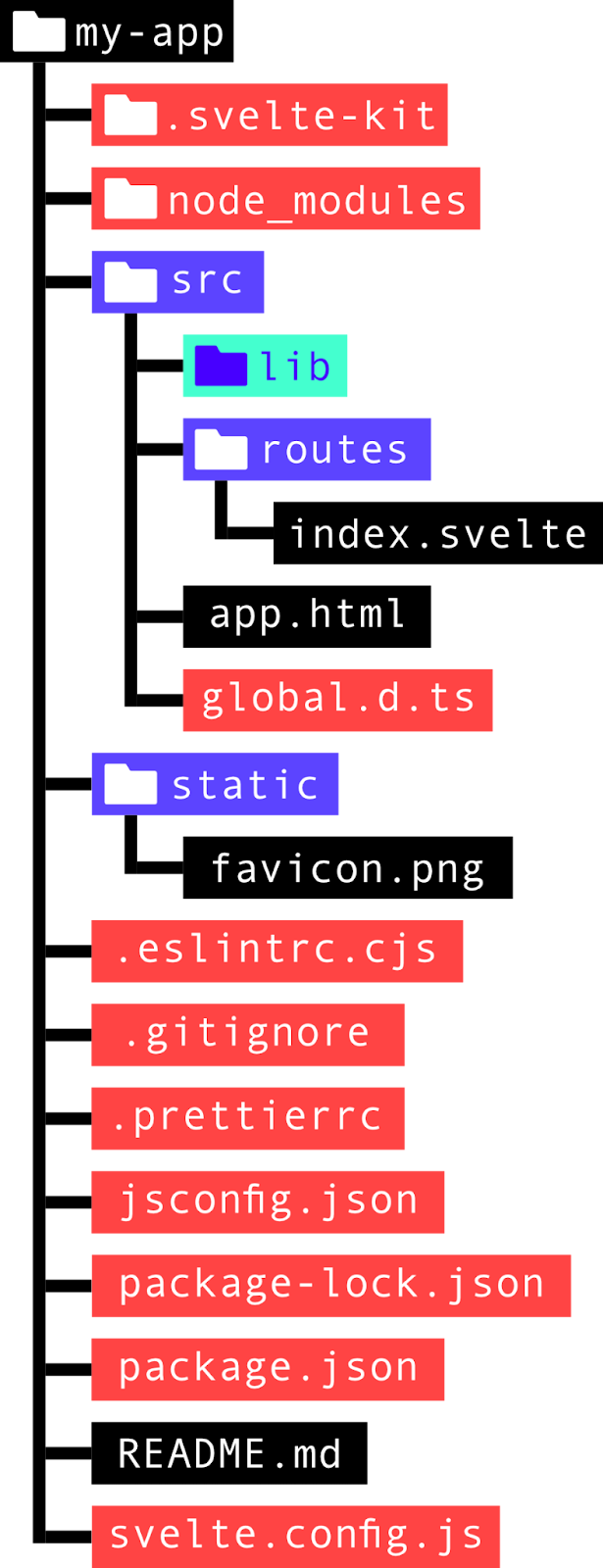
📝 Important Notes
📝 Note System Files (Pink in the image)
The pink files and folders contain Node.js packages and SvelteKit settings. You don't need to edit these files as a beginner!
Setting up your project structure:
-
Create a lib folder inside the src folder
- This stores all your reusable components
- Any JavaScript helper files go here too
- You can import from this folder using the
$libshortcut
-
The routes folder is special
- Each file here becomes a page on your website
index.svelte-> homepageabout.svelte-> about page- No configuration needed!
-
README.md is your project documentation
- Written in View on GitHub
GitHub Repository
en/get-started - Describe what your project does
- Add instructions for other developers
- Written in
🎨 Adding Bootstrap to SvelteKit
Want to use Bootstrap's beautiful styles in your SvelteKit project? Here's how to set it up!
Step One: Add Bootstrap CSS
Find the app.html file in your src folder. Add this stylesheet link inside the <head> tag:
ini
<link
  href="https://cdn.jsdelivr.net/npm/bootstrap@5.1.3/dist/css/bootstrap.min.css"
  rel="stylesheet"
  integrity="sha384-1BmE4kWBq78iYhFldvKuhfTAU6auU8tT94WrHftjDbrCEXSU1oBoqyl2QvZ6jIW3"
  crossorigin="anonymous" />
Step 2: Add Bootstrap JavaScript
Add this script tag before the closing </body> tag:
ini
<script
  src="https://cdn.jsdelivr.net/npm/bootstrap@5.1.3/dist/js/bootstrap.bundle.min.js"
  integrity="sha384-ka7Sk0Gln4gmtz2MlQnikT1wXgYsOg+OMhuP+IlRH9sENBO0LRn5q+8nbTov4+1p"
  crossorigin="anonymous">
</script>
Step 3: Start Using Bootstrap!
After adding these two code snippets, you can use all Bootstrap 5 classes in your Svelte components!
💡 Tip Bootstrap Version Note
This tutorial uses Bootstrap 5 (the latest version). If you learned Bootstrap 4 before, don't worry! Most things work the same way, but check the Bootstrap 5 cheat sheet for any differences.
📚 Summary
Let's review what you've learned about SvelteKit:
✅ Svelte vs SvelteKit
- Svelte = UI only (limited features)
- SvelteKit = Full-stack framework (all the features!)
✅ Key SvelteKit Features
- Automatic routing from files
- Server-side rendering (SSR)
- Hot-reloading for instant updates
✅ Project Structure
src/-> Your code lives herestatic/-> Images and assets go heresrc/lib/-> Reusable components (create this folder!)src/routes/-> Your pages
✅ Bootstrap Integration
- Add CSS link to
app.htmlhead - Add JavaScript before closing body tag
- Use Bootstrap 5 classes everywhere!
🎯 Practice Time!
Try these exercises to reinforce your learning:
-
Create Your First Route: Add a new file called
contact.sveltein the routes folder. What URL will it create? -
Component Challenge: Create a
Button.sveltecomponent in the lib folder. How would you import it using the$libshortcut? -
Bootstrap Test: After setting up Bootstrap, try adding a Bootstrap button to your index page. Does it work?
-
Explore the Structure: Look at your project folders. Can you identify which files are system files (that you shouldn't edit) and which are your working files?