Concept 4: List
Python Lists
🎯 Learning Objectives
By the end of this lesson, you will be able to:
- Understand what lists are and why we use them
- Create lists in different ways
- Access and modify items in a list
- Add and remove items from lists
- Use lists to solve real-world problems
ℹ️ Definition: A list is a data structure that stores a collection of items. Lists are ordered (items have positions) and changeable (you can modify them).
📚 Why Do We Need Lists?
- Variables store data while your program runs. But what if you need to store many similar items?
- Creating lots of separate variables takes up more memory and makes your code messy.
- For example, storing student names without lists would look like this:
ini
student_1 = "Sharvin"
student_2 = "Yong"
student_3 = "Sheng"
This approach creates too many variables!
- Python solves this problem with lists. You can store all the names in one variable:
ini
students = ["Sharvin", "Yong", "Sheng"]
Much cleaner with just one variable!
🔧 List Structure
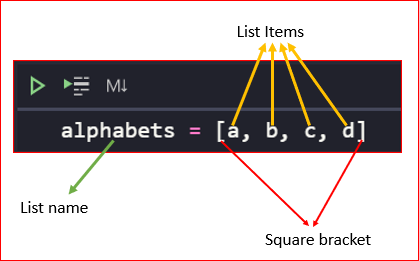
Every list has three parts:
- List name: The variable that holds your list
- Square brackets [ ]: These contain your items
- Commas: These separate each item
🎨 Types of Data in Lists
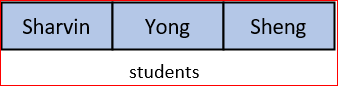
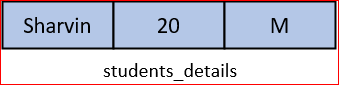
Lists can store different types of data:
| Data Type | Code Example | Output |
|---|---|---|
| Same Type | student = ["Sharvin", "Yong", "Sheng"] |
 |
| Mixed Types | student_details = ["Sharvin", 20, "M"] |
 |
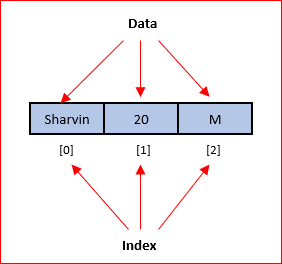
📝 Note Important: Every item in a list has an index (position number) starting from 0. The index tells you where to find each item.
🗂️ What You'll Learn
We'll explore five key list operations:
- Create and Generate Lists - Making new lists
- Access Items - Getting data from lists
- Change Items - Modifying existing data
- Add Items - Putting new data in lists
- Remove Items - Taking data out of lists
🏗️ Create and Generate List
Method 1: Manual Creation
You can create a list by typing all the values:
scss
numbers = [1,2,3,4,5,6,7,8,9,10,
          11,12,13,14,15,16,17,18,19,20]
print(numbers)
Expected output:
csharp
[1, 2, 3, 4, 5, 6, 7, 8, 9, 10, 11, 12, 13, 14, 15, 16, 17, 18, 19, 20]
Method 2: Using range() Function
Python provides a faster way using range() and list():
scss
numbers = list(range(1,21))
print(numbers)
Expected output:
csharp
[1, 2, 3, 4, 5, 6, 7, 8, 9, 10, 11, 12, 13, 14, 15, 16, 17, 18, 19, 20]
💡 The ending number in
range()is not included. This makes it easy to create lists with exact counts. For example,range(20)gives you exactly 20 numbers (0 to 19).
Creating Lists Starting from 0
pythonnumbers = list(range(20)) print(numbers)Expected output:
csharp[0, 1, 2, 3, 4, 5, 6, 7, 8, 9, 10, 11, 12, 13, 14, 15, 16, 17, 18, 19]
Breaking Strings into Characters
The
list()function can also split a string into individual characters:pythonchars = list("Hello, world") print(chars)Expected output:
css['H', 'e', 'l', 'l', 'o', ',', ' ', 'w', 'o', 'r', 'l', 'd']
Creating Empty Lists
Sometimes you need to start with an empty list and add items later:
pythonnumbers = [] print(numbers)Expected output:
css[]
🔍 Access Items in List
Getting a Single Item
Use the index number in square brackets to get an item:
pythonstudents = ["Sharvin", "Yong", "Sheng"] print(students[0])Expected output:
Sharvin
Negative Indexing
Python lets you count from the end using negative numbers:
pythonstudents = ["Sharvin", "Yong", "Sheng"] print(students[-1])Expected output:
Sheng
Getting Multiple Items (Slicing)
You can get several items at once using slicing:
pythonnumbers = [1,4,8,2] print(numbers[1:3])Expected output:
csharp[4, 8]
Finding an Item's Position
Use
.index()to find where an item is located:pythonnumbers = [1,4,8,2] print(numbers.index(8))Expected output:
2
Checking if an Item Exists
Use the
inkeyword to check if something is in your list:pythonnumbers = [1,4,8,2] print(4 in numbers)Expected output:
graphqlTrue
✏️ Change Item in List
Changing an item is simple - just assign a new value to that position:
pythonnumbers = [1,4,8,2] numbers[1] = 6 print(numbers)Expected output:
csharp[1, 6, 8, 2]
➕ Add Item in List
Method 1: append() - Add to the End
Use
.append()to add an item at the end of your list:pythonnumbers = [1,4,8,2] numbers.append(3) print(numbers)Expected output:
csharp[1, 4, 8, 2, 3]
Method 2: insert() - Add at a Specific Position
Use
.insert()to add an item exactly where you want it:pythonnumbers = [1,4,8,2] numbers.insert(2,3) print(numbers)Expected output:
csharp[1, 4, 3, 8, 2]
➖ Remove Item in List
Method 1: remove() - Remove by Value
Use
.remove()when you know what item you want to delete:pythonnumbers = [1,4,8,2] numbers.remove(8) print(numbers)Expected output:
csharp[1, 4, 2]
Method 2: del - Remove by Position
Use
delwhen you know the index of the item to remove:pythonnumbers = [1,4,8,2] del numbers[1] print(numbers)Expected output:
csharp[1, 8, 2]📝 Summary
Lists are powerful tools in Python that help you:
- Store multiple items in one variable
- Access items using index numbers (starting from 0)
- Modify, add, and remove items as needed
- Work with different types of data together tip Remember: Lists are like containers that can hold many items. You can think of them as a row of boxes, where each box has a number (index) and contains one item.
🎥 Video

🤖 AI Prompt
Code with AI: Try using AI to generate code involving lists and conditional statements.
Prompts:
- "Write a Python program that checks if a number is even or odd."
- "Generate Python code to find the largest number in a list."
🏃 Practice Time!
Try these exercises to master lists:
-
Shopping List: Create a list of 5 items you need from the store. Then:
- Add a new item using
append() - Remove one item using
remove() - Change the third item to something else
- Add a new item using
-
Number Explorer: Create a list of numbers from 1 to 10 using
range(). Then:- Print the first number
- Print the last number using negative indexing
- Print numbers from position 2 to 5
-
Name Checker: Create a list of your friends' names. Then:
- Check if "Alice" is in your list
- Find the position of one friend's name
- Add a new friend at position 2